Python Flask Data Structure

When working with Flask, developers often use Python data structures like dictionaries, lists, and classes to manage and organize data within the web app. Flask is designed to be simple and flexible, allowing developers to use any data structure they need to store and manipulate data in the backend of the application. For this documentation, I will show you the process of creating a CREATE, READ, UPDATE, AND DELETE (CRUD) function.
After we install the modules needed, we need to initialize the Virtual Environment (VENV) of the Python Flask Library by typing a command called venv\Scripts\activate

Now we can create and run our application in the environment.
Steps for creating a CRUD:
Create a file called index.html and app.py
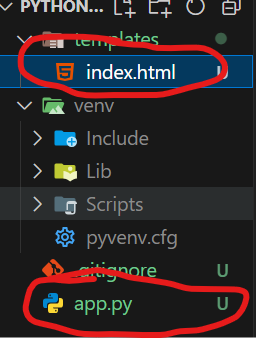
Inside the app.py file, we need to declare flask library imports and variables we will be using and add this specific list of student names
from flask import Flask, render_template, request, redirect, url_for;

app = Flask(__name__)


student_name = ["Spongebob", "Jimmy Neutron", "Alice"]
The index.html should be like this for routing and linking functions
<!DOCTYPE html>
<html lang="en">
<head>
    <meta charset="UTF-8">
    <title>Title</title>
</head>
<body>

<h1>Add Student</h1>
<form method="POST" action="/add">
<input type="text" name="name" placeholder="Input Student" required >
    <button type="submit">Add</button>
</form>
<br>
<br>


<table border="1">
    <thead>
        <tr>
            <th>index</th>
           <th>Name</th>
            <th>Action</th>
        </tr>
    </thead>
    <tbody>
    {% for index, student in students %}
        <tr>
            <td>{{index}}</td>
            <td>{{student}}</td>
            <td >

                <form method="POST" action="/edit_student/{{ index }}">
                    <input type="text" name="new_name" value="{{student}}" required/>
                    <button type="submit">Submit</button>


                <a href="/delete/{{student}}" >Delete With Student Name</a>
                <a href="/delete-with-index/{{index}}">Delete With Index</a>
                <a href="/select/{{student}}">Select Student</a>
                </form>

            </td>
        </tr>
    {% endfor %}
    </tbody>
</table>
</body>
</html>
Back in our app.py
Fetch Student List Function
This code defines a Flask route at the root URL (/) that retrieves a list of student names with their corresponding index using enumerate(). It passes this list of indexed students to the index.html template to be displayed.
@app.route('/')
def fetch_student_list():
    student_with_index = list(enumerate(student_name))
    return render_template('index.html', students = student_with_index)
Student name List Data Structure
Here’s the default data inside the tables
student_name = ["Spongebob", "Jimmy Neutron", "Alice"]
Add Student Function
This Flask route listens for POST requests at the /add URL, where it retrieves a student's name from the form data using request.form.get('name'). If a name is provided, it's added to the student_name list, and the user is redirected to the fetch_student_list route to view the updated list of students.
@app.route('/add', methods=['POST'])
def add_student():
    name = request.form.get('name')
    if name:
        student_name.append(name)
    return redirect(url_for('fetch_student_list'))
Edit Student Function
This Flask route listens for POST requests at /edit_student/<int:index>, where it retrieves a new student name from the form data using request.form.get("new_name"). The student's name at the specified index in the student_name list is updated, and the user is redirected to the fetch_student_list route to view the updated list.
@app.route('/edit_student/<int:index>', methods=['POST'])
def edit_student(index):
    new_name = request.form.get("new_name")
    student_name[index] = new_name
    return redirect(url_for('fetch_student_list'))
Delete Student Function
This Flask route listens for requests at /delete/<string:name>, where it removes the specified student name from the student_name list using remove(name). After deletion, the user is redirected to the fetch_student_list route to view the updated list of students.
@app.route('/delete/<string:name>')
def delete_student(name):
    student_name.remove(name)
    return redirect(url_for('fetch_student_list'))
Delete with Index Function
This Flask route listens for requests at /delete-with-index/<int:index>, where it removes the student at the specified index from the student_name list using pop(index). After deletion, the user is redirected to the fetch_student_list route to view the updated list of students.
@app.route('/delete-with-index/<int:index>')
def delete_student_with_index(index):
    student_name.pop(index)
    return redirect(url_for('fetch_student_list'))
Selected Student Function
This Flask route listens for requests at /select/<string:name>, where it prints the selected student's name to the console using print("selected", name). After printing, the user is redirected to the fetch_student_list route to view the list of students.
@app.route('/select/<string:name>')
def selected_student(name):
    print("selected " , name)
    return redirect(url_for('fetch_student_list'))
This block ensures that the Flask app starts when the script is run directly, and it enables debug mode for easier development.
if __name__ == '__main__':
    app.run(debug=True)


