Mastering Python List Data Structure

With a deep understanding of Python's list data structure, we have to master and remember some of the fundamentals in creating a list, allowing me to efficiently manipulate, organize, and analyze data through dynamic operations like indexing, slicing, and iterating.
For this documentation, here’s the provided example of creating and manipulating a list data structure.
CARS LIST:
First, I created a list of cars:
cars = ["Honda", "Ford", "Suzuki", "Geely", "Toyota"]
The output of this just shows the names inside this list.
["Honda", "Ford", "Suzuki", "Geely", "Toyota"]
MANIPULATING LIST:
This shows how to add a data inside the Car List
# Add a car to the end of the list
cars.append("Lamborghini")
print(cars)
#Output is: ["Honda", "Ford", "Suzuki", "Geely", "Toyota","Lamborghini"]
Printing the third element of the Car List
#Print the third element of the list
print("The third element of this list is: ", cars[2])
#Output is: The third element of this list is: Suzuki
Removing the fourth element of the Car List
# Remove the fourth element from the list
print()
cars.remove("Geely")
print(cars)

#Output is: ["Honda", "Ford", "Suzuki", "Toyota", "Lamborghini"]
Slicing the third and fourth element of the Car List
print("Slicing from the third to the fourth element: ", cars[2:4])
#Output: Slicing from the third to the fourth element:  ['Suzuki', 'Toyota']
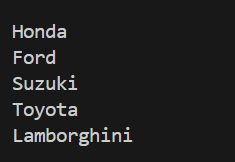
Iterating list in Car List
for car in cars:
    print(car)
print()
Output